
Startups & support@
How to handle support@ as a solo or 3-person SaaS founder (without hiring, and without a bot that traps people)
Sort support@ into four categories, give each a written promise and an automation level, and check the handoffs every week. Here is the runbook, plus the six ways it breaks.
Short answer
Keep one support@ address and sort every email into four categories: pre-sales, how-do-I support, billing and bugs. Give each category an owner, a written reply-time promise and an automation level. Let software answer only from a short facts sheet. Send money, security and angry emails to a founder, and tell the customer when a person will reply. Check handoffs weekly: Gorgias found one-third of AI-handed-off tickets never got a human reply (Oct 2025 to Apr 2026).
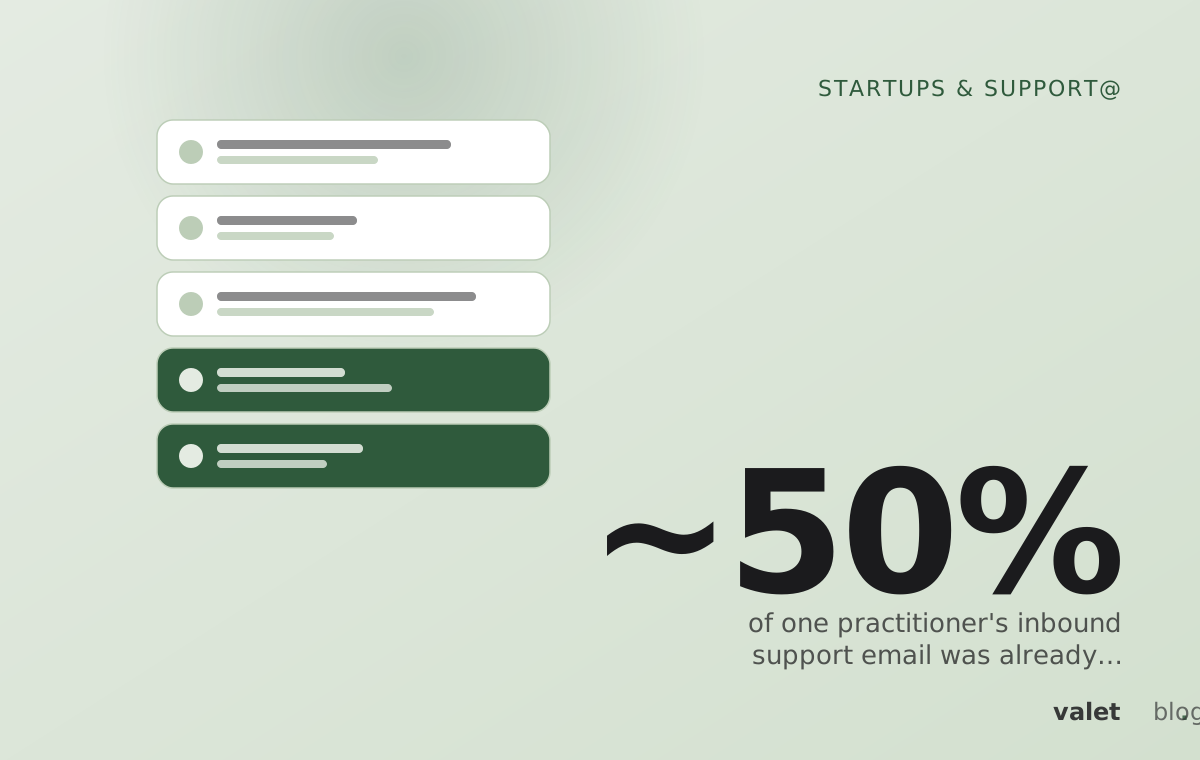
~50%
of one practitioner's inbound support email was already written out in the FAQ
Hacker News comment by a former support lead who ran Fin implementations, Jun 2026
1 in 3
AI-handed-off tickets never got a human reply
Gorgias Ecom Lab, accounts with 200+ AI-touched tickets, Oct 2025 to Apr 2026
30%
of email handoffs were abandoned, after a 32-hour resolution time
Gorgias Ecom Lab, Oct 2025 to Apr 2026
Run support@ as a sorted queue with written promises. Sort every email into four categories: pre-sales, how-do-I support, billing and bugs. Give each category an owner, a reply-time promise and an automation level. Let software answer only from a facts sheet you wrote. Send money, security and angry emails to a founder. Tell the customer the time a person will reply. Plan for about two hours of setup and 30 minutes of review each week.
The weak point is the handoff nobody owns. In Gorgias platform data (October 2025 to April 2026), 55% of AI-touched tickets went to a human, and one-third of those never got a human reply4.
Who should use this support@ runbook?#
This support@ runbook fits SaaS teams of one to three people who answer customer email themselves. One founder in r/EntrepreneurRideAlong put the job plainly (thread with 20+ comments, mid-2026): "I am one person. I write code, I do support, I handle billing issues." A solo founder on Ask HN in 2022 reported an average of 15 to 20 user emails a day2.
Use this runbook if:
- A founder answers support@ between other work, up to about 50 emails a day.
- Customers write from more than one time zone.
- You want some automation, but not a widget that blocks the way to a person.
Do not use it if:
- A full-time support hire already owns the queue. Use their process.
- Most support happens in shared Slack channels with customers.
- Customer contracts set response times. Copy those in first.
What do you need before you start?#
Prerequisites for this runbook are access, a sample of real email and one written page. Collect them first.
- Mailbox admin access. You need the right to add forwarding and filters on the host that receives support@ (Google Workspace, Microsoft 365 or your email host).
- DNS access, if any tool will send replies as support@.
- A sample. Pull the last 90 days of support@, or at least the last 50 threads.
- Your source documents. Pricing page, refund policy, plan limits, docs and status page URL.
- Named owners. One person per category. Solo? Write your name anyway.
Dry run: the support@ audit#
The support@ audit is a one-hour count of what your inbox already holds. Do it before automating anything.
- List the last 50 to 100 threads. Verify: your count matches the mailbox count.
- Tag each thread. Use pre-sales, support, billing, bug or other. Verify: "other" holds under one in ten. If it holds more, add a category.
- Note the hour. Mark each thread that arrived outside your working hours.
- Mark doc-answered threads. Flag every thread your FAQ or docs answer word for word. Verify: you can paste the exact link.
- Mark dropped threads: no reply, or stopped after one.
You now have four numbers per category: volume, after-hours share, doc-answered share and dropped share. One former support lead who ran Fin rollouts wrote that "~50% of the inbounds I receive are fully written out in plain language in an FAQ"1. Your share will differ. Measure it. Do not borrow it.
How to set up support@ in eight steps#
Setting up support@ for a small SaaS team takes eight steps, in order. Each step has a check and an exit.
- Keep one address. Forward sales@, billing@ and help@ into support@. Verify: a test to each alias lands exactly once. If not, fix forwarding before step 2.
- Create the four category labels. Add filters on subject words as a first pass: "invoice", "refund", "pricing", "error". Verify: rerun the filters on your audit sample. If fewer than seven in ten land right, tag by hand for one week and try again.
- Write the facts sheet. Use one page: plans, prices, limits, trial length, refund policy, integrations, approved security answers, status page URL, known bugs. Date it. Verify: every line has an owner and a date. Do not proceed if the refund policy is unwritten. No software touches billing without a written rule.
- Set a reply-time promise per category. Use the starting values in the runbook below. Verify: would you have kept each promise on last month's sample? If not, loosen it. A kept eight-hour promise beats a missed one-hour one.
- Pick an automation level per category. Use three levels: Autopilot (software sends answers from the facts sheet), Draft (software drafts, a founder approves) and Always you. Start one level more careful than feels right. Verify: list the exact questions each Autopilot category may answer. Anything off the list routes to Draft.
- Write the handoff line. Every email that waits for a person gets a reply naming the reply-by time. Verify: a test that must hand off shows a time and a time zone.
- Set the overnight rule. See the next section. Verify: send a test at 23:00 your time and read what goes out.
- Book the weekly review. 30 minutes, same day each week. Verify: the first review has a written log.
How do you cover nights and other time zones with one to three people?#
Overnight support for a small SaaS team comes down to two choices: what may be answered at 3 a.m., and what time you promise for the rest. A founder thread in r/indiehackers ("International expansion almost killed my startup", 10+ comments) opens with "Customer in Japan has problem at 3am."
Gorgias found 53% of pre-purchase questions on its e-commerce platform arrive outside business hours, with a median first response of about 15 hours, against 2.2 hours in hours (July 2026)5. Those are store numbers. Treat them as a warning.
- Answer at any hour: anything the facts sheet covers word for word.
- Hold for a person: money, security, outages, angry tone, and anything not on the sheet.
- Promise in their time zone. "Tomorrow morning" means nothing to a customer eight hours away.
- Split by hours, not by topic. With founders in two zones, each owns the whole queue in their waking block. Hand over a written list of open threads and reply-by times.
- Outages go to the status page. Reply with the link. Never let software guess a cause or a fix time.
The support@ runbook#
The support@ runbook maps each category to an owner, a promise, an automation level and an escalation rule. Adjust the starting promises after two weekly reviews.
| Category | What lands here | Owner | Reply-time promise (start) | Automation level | Escalate to a founder when |
|---|---|---|---|---|---|
| Pre-sales | Pricing, plan fit, "does it do X", demo requests | Founder who sells | Facts answers any hour; a person within 2 working hours | Autopilot for sheet facts; Draft for custom asks | Custom price, discount, contract or security questionnaire |
| Support (how-do-I) | Setup, settings, integrations, how-to | Product founder | Same working day | Autopilot when a doc answers word for word; else Draft | Two replies without a fix, or the customer asks for a person |
| Billing: routine | Invoice copy, receipt, card-update link, plan change at list price | Billing owner | Same working day | Autopilot from the sheet | Any amount not on the price list |
| Billing: money | Refund, credit, discount, cancellation, chargeback threat | Billing owner | Handoff line at once; decision within 1 working day | Always you | Always |
| Bugs | Errors, broken feature, wrong data | Engineering founder | Acknowledge within 4 working hours, asking for steps, browser, account | Draft the acknowledgement; Always you for diagnosis and dates | Data loss, security, or two customers report the same thing |
| Security, privacy, legal | Data deletion, DPA, breach question, terms | Founder named in your privacy policy | Handoff line at once; answer within 2 working days | Always you | Always |
| Complaints | "Cancel now", public threat, third email on one issue | Any founder | Within 4 working hours | Always you | Always |
| Other | Partners, press, spam | Whoever triages | Weekly | Draft or archive | Money or press involved |
Handoff line (paste into every reply that waits for a person):
"I'm [Company]'s AI assistant. A founder handles [refunds / this question].
[Name] will reply by [time, customer's time zone, day].
If anything changes before then, reply here and it goes straight to them."

Overnight rule: sheet facts go out at any hour. Everything else gets the
handoff line with a reply-by time at the start of the next working block.
What should software never answer on its own?#
Software answering support@ should never state a rule, a price or a promise that is not on your facts sheet. Cursor showed the cost in April 2025. Its email support bot, "Sam", told a user the product was "designed to work with one device per subscription as a core security feature." No such policy existed3.
Users posted cancellations. About three hours later a Cursor rep called it "an incorrect response from a front-line AI support bot"; the user was refunded3. Put these on the never list:
- Refunds or credits outside the written policy.
- Discounts of any size.
- Security and compliance claims not on the sheet.
- Roadmap dates, outage causes and fix times.
- Legal requests and data deletion.
- Any change to a customer's money or data without a written rule.
Unsure whether to automate? Read should a startup use AI for customer support.
Failure modes and rollback#
Support@ runbooks fail in six known ways. Each has a check, a fix and a rollback trigger. Run the checks weekly.
Failure 1: the customer cannot reach a person#
A trapped customer is the most common founder complaint about support bots. A thread in r/micro_saas titled "We lost 56 customers after I tried to save money with AI" drew 240+ comments in September 2026. Its stated fix was to "escalate to a human when it detects the AI is stuck on a loop." On Ask HN in May 2026, one commenter wrote: "The worst part is when the AI keeps repeating the same thing again and again instead of just connecting you to a real person"6.
Five9 surveyed 1,006 consumers in the US, UK and Canada: "72% of consumers are open to AI-powered interactions, provided they can escalate to a human when needed"7.
- Check: search sent mail for threads with three or more automated replies.
- Fix: route to a founder on the words "person", "human", "cancel" or "refund", or on a second email about the same issue.
- Rollback trigger: one thread where a customer asked for a person and got another automated answer.
Failure 2: software states a policy you do not have#
An invented policy is the Cursor failure: software fills a gap in the facts sheet instead of handing off.
- Check: read every automated reply that mentions money, limits, devices, seats or security. Each must match a line on the sheet.
- Fix: add the missing line, or move the topic to Always you.
- Rollback trigger: any reply with no matching line. Pause the topic, and have a founder email a correction within one working day.
Failure 3: the handoff goes nowhere#
An unowned handoff is the failure the numbers show most clearly. In Gorgias data from accounts with 200+ AI-touched tickets (October 2025 to April 2026), the median wait after handoff was 10 hours and the 90th percentile was 71 hours. 30% of email handoffs and 42% of contact-form handoffs were abandoned4. These are e-commerce figures.
- Check: each morning, filter "waiting on founder" for anything past its reply-by time.
- Fix: every handoff carries a reply-by time and a backup owner.
- Rollback trigger: two missed reply-by times in one week. Loosen that promise before you add more automation.
For a full handoff standard, see how to hand off from AI to a person without trapping anyone.
Failure 4: the autoresponder promises a time you miss#
A generic autoresponder is the lone founder's default. One r/shopifymerchantgrowth thread describes an "auto responder… we will be back in 24 hours." Gorgias's benchmark puts the median email first response at "12+ hours." Brands automating close to zero percent averaged 736-minute response times8.
- Check: compare last week's promised and real first-reply times.
- Fix: state the real time, then shorten it by fixing the queue.
- Rollback trigger: the promise was missed more than once.
Failure 5: the facts sheet goes stale#
A stale facts sheet produces confident wrong answers. A founder of a human-powered support service wrote on Hacker News: "The tech isn't the hard part, the AI needs access to high quality context"9. A builder in another thread named the hard parts as "reviewing the logs of actual usage" and "tuning human escalation procedures"1.
- Check: compare the sheet's date with your last pricing, plan or policy change.
- Fix: change the sheet the same day as the change ships.
- Rollback trigger: the sheet is older than the last change. Drop affected topics to Draft until it is updated.
Failure 6: the bill grows on resolutions you cannot check#
Per-resolution billing counts different things by vendor. Fin charges "$0.99 per outcome · 50 outcomes per month minimum," and one counted outcome is "No further help is requested after Fin's last answer"10. Help Scout charges $0.75 per AI resolution and does not count it if the customer escalates or clicks "I still need help"11. Prices checked 1 October 2026.
- Check: each month, read 20 billed resolutions.
- Fix: if several were customers giving up, move that category to Draft.
- Rollback trigger: you cannot see what was billed. See what counts as an AI resolution.
Rollback sequence#
The rollback sequence works for any category after any failure. Run it in order.
- Drop the category to Always you. Verify: a test email gets the handoff line, not an answer.
- Pull every automated reply in that category since the last review.
- Email each affected customer from a founder. Say what was wrong and what you will do.
- Fix the sheet line or routing rule.
- Send five test emails. Only then move the category up one level: Always you to Draft, never straight to Autopilot.
- Log it. Write the failure and the fix in the weekly review log.
The 30-minute weekly support@ review#
The weekly support@ review keeps the other seven steps honest. Run the same agenda each time.
- Count. Volume by category against last week.
- Promises. List each missed reply-by time, and why.
- Read ten automated replies. Each must match a sheet line.
- Repeats. Name the top three repeat questions. Fix the product first, then the docs. One popular r/SaaS comment (August 2026) put it: "Repeated questions -> think about product design first, then if not add FAQs."
- One decision. Move one category up or down one automation level. Write it in the log.
Where Valet fits#
Valet is one way to run steps 3 to 7 without moving to a helpdesk. You forward support@ to a private Valet address, and replies go out from support@ once your domain is verified. Valet answers only from your own facts and never invents a price, discount or policy. Each topic runs on Autopilot, Ask me first or Always you, the same three levels as this runbook. Money, complaints and legal questions go to you with one-tap replies, and the customer is told when you will reply. Every reply says it is AI and comes with a Valet receipt: what was asked, the rule used, the sources. To see where your inbox stands today, start with the free lead check: forward 10 to 20 recent emails and see what went unanswered.
Questions people ask
How should a solo founder handle customer support?
Use one support@ address, sort email into pre-sales, support, billing and bugs, and write a reply-time promise for each. Automate only answers that sit word for word on a facts sheet, and send money, security and complaint emails to yourself with an honest reply-by time.
What should a small SaaS team never let an AI support bot answer?
Refunds or credits outside written policy, discounts, security and compliance claims, roadmap dates, outage causes, and legal or data-deletion requests. In April 2025 Cursor's support bot invented a one-device policy, and users posted cancellations before the company corrected it.
How do you cover support overnight with a tiny team?
Let software answer at any hour only what the facts sheet covers. For everything else, send a reply that names the time a person will answer, in the customer's time zone, and keep that promise.
How much time does a weekly support review take?
Plan for 30 minutes: count email by category, list missed reply-by times, read ten automated replies against the facts sheet, pick the top repeat questions, and move one category up or down one automation level.
Sources
Confidence: H primary source checked · M credible secondary or reported · L vendor claim or single report. Reddit and forum items are quoted from public threads and summarised, not endorsed.
- Hacker News discussion thread, item 48540126 (Salesforce and Fin) · Hacker News · 2026-06 H
- Ask HN: Solo founders - How are you handling customer support? · Hacker News · 2022-07-22 M
- Cursor AI support bot invents fake policy and triggers user uproar · Ars Technica · 2025-04-17 H
- The cheapest ticket is the one a human never touches · Gorgias Ecom Lab · 2026 H
- Your team is sleeping on 53% of shopper questions · Gorgias Ecom Lab · 2026-07 H
- Ask HN: Will low quality AI customer support be the new normal? · Hacker News · 2026-05-10 H
- New Five9 Research Reveals Balancing AI with Human Connection is Key to Winning Customer Experience · Five9 · 2025-03-13 H
- Customer service benchmarks · Gorgias · 2026-05-15 H
- Hacker News discussion thread, item 48128842 (Intercom changes name to Fin) · Hacker News · 2026-05 H
- Fin pricing · Fin (formerly Intercom) · 2026-10-01 H
- Help Scout pricing · Help Scout · 2026-10-01 H
How to cite this page
Cite this page
Valet, "How to handle support@ as a solo or 3-person SaaS founder (without hiring, and without a bot that traps people)", valet.team, October 2026.
Keep reading
 Startups & support@Should a startup use AI for customer support? What founders who lost customers say, and the three missing controlsCustomers accept AI support when they can reach a person. The failures that cost startups customers trace to three missing controls, not to the model.Data desk · 11 min · 1 October 2026
 Startups & support@An AI agent that answers vs one that finishes the job: what "acts" means for a small business, and the four controls that make it safeMost AI tools sold to small businesses answer the first message and stop. This piece defines what it means for an agent to finish the job, traces where answer-only tools lose the inquiry, and sets out the four controls that make acting safe.Technical desk · 11 min · 1 October 2026
 Startups & support@Why inbound leads don't convert at a tiny startup: the demo-request and sales@ inbox nobody readsAt a seed-stage startup, inbound usually dies in the reply, not the lead. This runbook shows how to test your own demo-request flow, set up sales@ so every request gets a complete answer, and catch the failure modes before they cost a deal.Playbooks · 10 min · 1 October 2026